
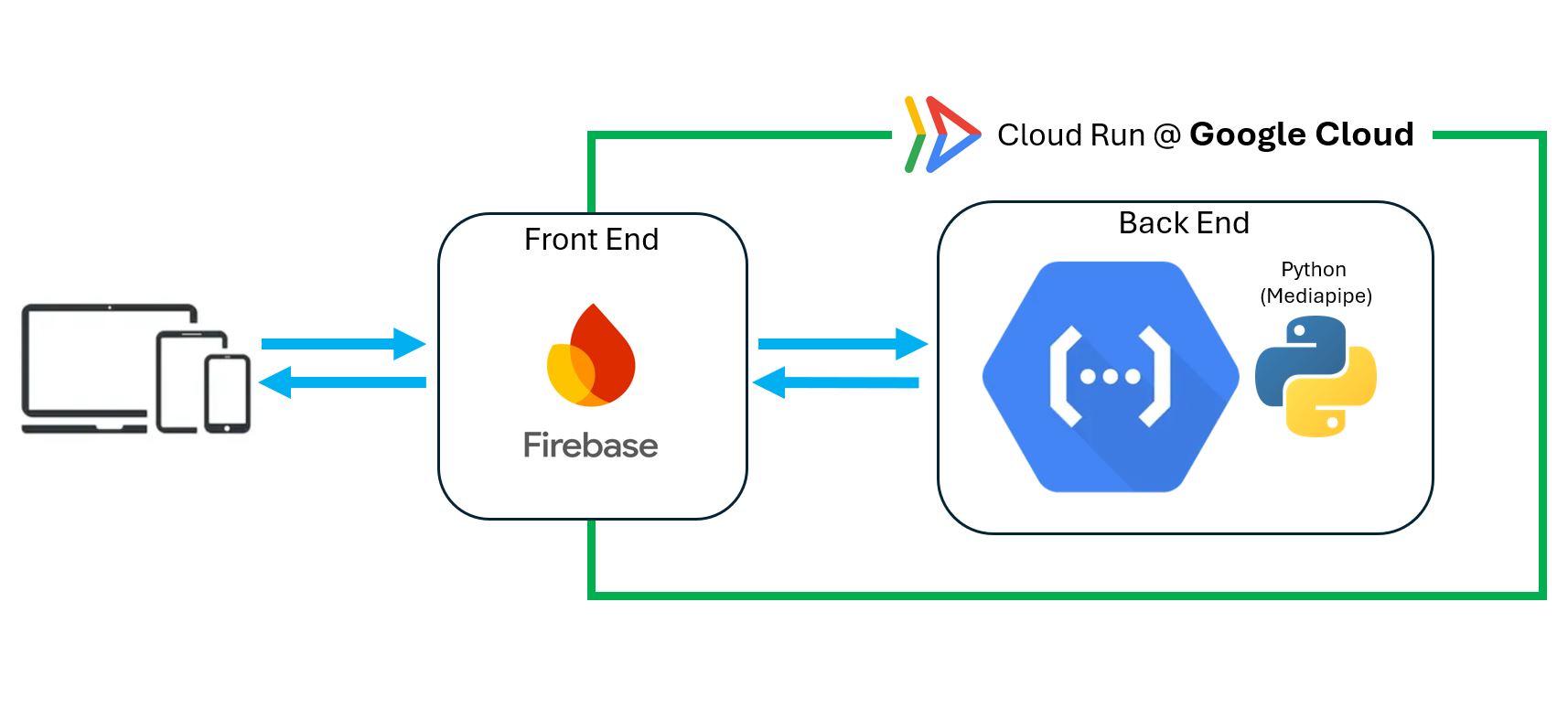
The "Evaluate" page requires Backend running Python with Mediapipe to process the user uploaded video and send the annotated video with Lunge analysis results back to the Front-end. In this project, the Backend is deployed as a Google Cloud-Run service. The Front-end is deployed using the Google Firebase platform.
Cloud Run is a managed platform that takes user's Docker Container and abstracts away the infrastructure. Instead of managing web "servers" in the old way, Cloud Run allows user to manage "services".
Python backend application code is packaged into an Image via a Dockerfile. This image is a self-contained unit that ensures the application runs consistently across different environments. Once uploaded, it is stored in the Artifact Registry, Google Cloud Run uses it as the "blueprint" for running the application.
A Cloud Run service is created from the container image. This service represents a deployed, publicly accessible endpoint that listens for incoming HTTP requests. Each request is handled by an instance of the container, which starts automatically when traffic arrives.
Cloud Run uses Horizontal Autoscaling.
This scaling happens transparently, without any manual intervention.
Using Google Cloud Run provides several advantages:
Google Cloud Run takes a Docker container image, deploys it as a managed service, and automatically scales the number of running instances based on incoming requests. This makes it well-suited for backend APIs, machine-learning inference services, and web applications that require flexibility and scalability without infrastructure complexity.
Official Cloud Run DocumentationGoogle Firebase is a platform for hosting and delivering web applications, especially front-end user interfaces. In this project, Firebase is used to host the website that users interact with through their web browser.
The project's web pages (HTML, CSS, Images, Videos and JavaScript files) are uploaded to Firebase Hosting. Firebase stores these files and serves them to users through a global content delivery network (CDN).
Firebase Hosting is designed for static front-end content, meaning it serves files without running server-side code. This makes it well-suited for web interfaces that communicate with a separate backend service.
The Firebase-hosted website communicates with the backend deployed on Google Cloud Run using HTTP requests.
Firebase's CDN is a worldwide network of servers called "edge servers" that caches the website's static content and delivers it from the location closest to the user, drastically reducing load times, improving performance, and providing a more reliable experience for users anywhere globally. It's integrated into Firebase Hosting, automatically clearing old cached content when new updates are deployed.
Using Firebase for the front-end provides several advantages:
Google Firebase hosts and delivers the front-end web pages, while Google Cloud Run hosts the backend application. Firebase serves the user interface, and Cloud Run processes user requests and performs computation. Together, they form a scalable, efficient, and easy-to-manage web architecture that supports interactive applications without requiring manual server management.
Firebase Hosting DocumentationConnecting a custom domain to the Firebase frontend creates the "Identity" of my App. This layer maps a human-readable name to the Firebase CDN.
To provide a professional and user-friendly web address, a custom domain LungeLab.com was purchased using Google Cloud Domains and managed through Cloud DNS. This domain was then connected to Firebase Hosting as a custom domain, allowing users to access the project using a personalized URL instead of a default Firebase address.
The domain's DNS settings are managed in Google Cloud DNS. Firebase Hosting provides specific DNS records that verify ownership of the domain and map it to the Firebase-hosted website. Once these records are added to Cloud DNS:
By linking the custom domain to Firebase Hosting:
This setup allows the entire application — domain, frontend, and backend — to operate within the Google Cloud ecosystem, while keeping each component modular and independently managed.
Using a custom domain with Firebase Hosting provides several benefits:
Linking a custom domain to Firebase Hosting allows users to access the project through a personalized web address while leveraging Firebase's fast and secure hosting infrastructure. Combined with Cloud Run for backend processing, this approach integrates all components — domain management, frontend hosting, and backend services — into a cohesive and scalable Google Cloud–based system.
Google Cloud Domains Documentation